Salisbury University |  Instructional Design & Delivery Newsletter | August 25, 2026

Instructional Design and Delivery: News and Events

What's New for Fall 2026

Introducing Akindi

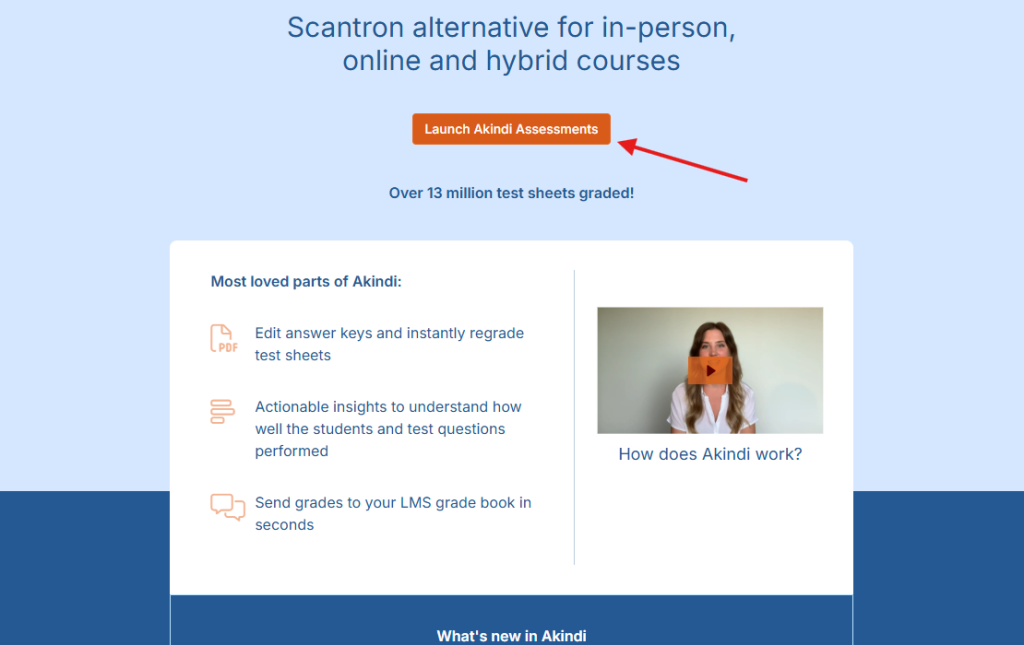
Akindi is an end-to-end, web-based paper assessment platform (replacing scantron services). The assessment process is in one place — writing, printing, scanning, and grading — with no other tools needed. It connects directly to MyClasses Canvas, so your roster syncs automatically and grades land right in your gradebook. However, assessments in Akindi are not associated with the Quizzes tool in MyClasses. Register and attend the next Akindi 101 webinar on Thursday, August 27 at noon.

Launch Akindi Assessments welcome screen

Turnitin: Multipart Assignments

Turnitin functionality has been updated in MyClasses and instructors have two different methods for creating Turnitin assignments. Review our comparison chart to identify features needed for the assignment then follow the appropriate method to create the assignment. 


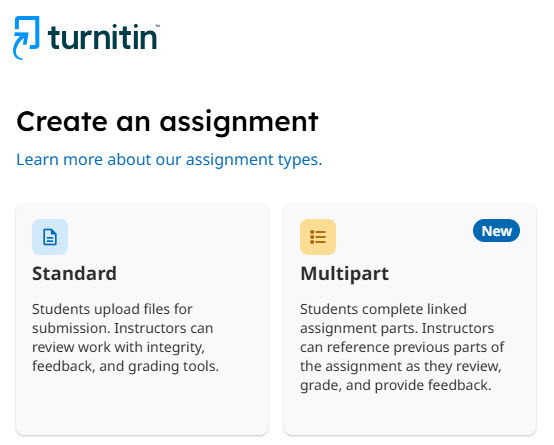
For example, instructors can create a multipart assignment for students to complete a larger assignment in connected stages. Each part has its own title, instructions, dates, settings, and submissions.

Turnitin create an assignment with Standard option on the left and Multipart option on the right.

Portfolios in MyClasses

A new Portfolio tool is available in MyClasses which will replace the existing portfolio tools. The new tool offers two types of portfolios to support both learner-driven and instructor-guided use cases: Showcase Portfolios and Evaluation Portfolios. The previous portfolio tools in MyClasses, which show as ePortfolios (Legacy) and Folio (Legacy), will be retired in December 2026 and will no longer be accessible from MyClasses.

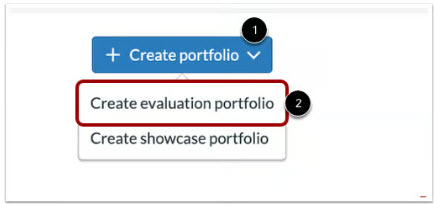
Step 1, select create portfolio and then in step two select either create evaluation or create showcase portfolio. Depicted for step 2 was the create evaluation portfolio.

Peer Review Enhancements

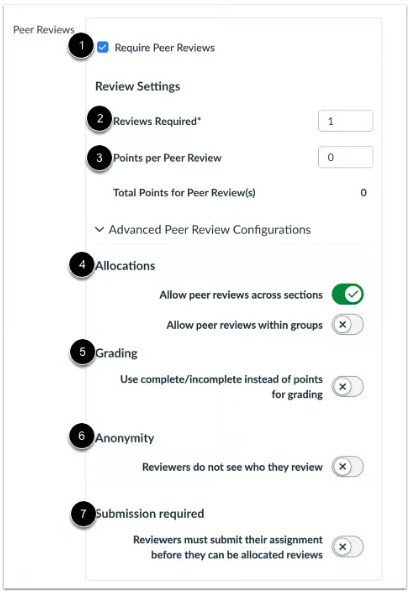
Assignments set to use the Peer Review feature now have an additional Peer Review Allocation and Grading option that supports independent due dates and point values.

Peer Review settings where Allocations allow peer reviews across sections is enabled.

MyClasses Tip: Fixing Broken Links

Validate Links in Content

As you reuse content from semester to semester, best practice is to check to make sure that the resources you link to within your course are valid links. For example, SU Libraries has updated and changed their website!


You can check these links using the Course Link Validator, which searches through course content and returns invalid or unresponsive links in including links are links that are still in the course, but their linked content has been deleted (such as a course file or page). 


Review the How do I find broken links in my course? knowledge base article for more information, including a video demonstrating how to interpret the link validation report.

Guidance on Syllabus AI Policies and Statements

Salisbury University has consolidated all university-wide syllabus statements and student support resources on the central SU Course-related Policies and Resources page which is updated annually. 


However, if you are looking for guidance on incorporating AI guidance into courses/assignments, please review the AI Task Force recommendedSyllabus Course Policies - Generative AI Considerations article. The statements identify a course/assignment as AI Restrictive, AI Conditional, or AI Inclusive and help set clear expectations for students.

Important Dates for Fall 2026 Regular and 7 Week 1 Session

  • Monday, August 17: 
    • Deadline for faculty to request courses to be combined in MyClasses (especially for those using Inclusive Access course materials).
    • Faculty of online, remote and hybrid courses should send a welcome letter to students with information pertinent to the modality and first steps in starting the course. ID&D provides a welcome letter template (ask your instructional designer liaison) for faculty to modify and distribute to students using the class distribution lists in email.
     
  • Monday, August 24: 
    • Student access to fall regular and 7-Week 1 courses in MyClasses (provided faculty publishes course).
    • Courses using Inclusive Access will see course materials and information through the Vital Source option on the course menu in MyClasses.
     
  • Monday, August 31: Start of fall regular and 7-week 1 sessions
  • August 31 - September 1: Drop/Add Dates for 7-Week 1 Session
  • August 31 - September 4: Drop/Add Dates for Regular session
  • Wednesday, September 9: Deadline for students to opt out of Inclusive Access course materials
  • Fall Break: October 19-20: No classes are held
 

Faculty and Staff Professional Development Calendar

The Faculty and Staff Professional Development Calendar provides a central location where professional develop opportunities offered at Salisbury University or through external partners (e.g. NCFDD, USM Kirwan Center, instructional software companies).


If you are hosting a professional development opportunity or are aware of an opportunity either within SU or through an outside resource, you can submit the professional develop to suidd@salisbury.edu or cafe@salisbury.edu to have the event added to the calendar.

Change in ID&D Newsletters

As part of our ongoing commitment to supporting teaching excellence, ID&D is introducing a new approach to our newsletter series. While you will still receive a newsletter every other Tuesday at 10 a.m., we will alternate the foci of the newsletters as follows: 

Teaching Takes Flight

Beginning September 8, a focus on teaching and learning, sharing evidence-informed strategies, instructional design insights, faculty perspectives, and examples of how effective teaching practices take flight at Salisbury University.

ID&D News and Events

Continuation of our traditional newsletter with a focus on instructional software updates, professional development opportunities, upcoming events, teaching resources, and connections to initiatives across Salisbury University and the USM Kirwan Center.

Need Assistance?

Ways to get help:

♦ Search our ID&D Knowledge Base

♦ Submit a Help Request

♦ Contact your Instructional Designer 

♦ Schedule a Virtual Appointment

Visit & Follow Us

Department Information:

W: salisbury.edu/instructionaldesign

E: suidd@salisbury.edu

O: Guerrieri Academic Commons, 220

P: 410-677-6585

Instructional Design and Delivery YouTube
Instructional Design and Delivery  X (formerly Twitter)
Instructional Design and Delivery Workshop Calendar
Salisbury University Logo

SU is an Equal Opportunity/AA/Title IX university and provides reasonable accommodation given sufficient notice to the University office or staff sponsoring the event or program. For more information regarding SU's policies and procedures, please visit www.salisbury.edu/equity.


View Online