Salisbury University |  Instructional Design & Delivery Newsletter | October 17, 2023

Instructional Design and Delivery

Open Pedagogy: Student-Generated Questions

Open pedagogy is the practice of supported experiential learning for students focused around open educational materials. Through open pedagogy, students become part of the teaching process and become collaborators with the instructor in the educational process, such as by creating reusable instructional resources.


One open pedagogy strategy is to have students generate questions for assessments that they will take during the course, an example of a reusable instructional resource.  For students to generate questions, they have to read and engage with the course materials on a deeper level. This active-learning practice can be used to help students focus their study for exams while giving ownership of the questions used on the exams to the students. 


Bringing students into the creation of quiz or exam questions also benefits the instructor by providing formative feedback about their students’ understanding of materials. It can also help reduce the cognitive load for the instructor of constantly trying to come up with new questions and can help build an evolving question bank for the instructor to use over many semesters.   


Review ID&D articles for more information about Open Pedagogy and Student-Generated Questions.

Faculty Playlist: The Art and Science of Crafting Traditional-Style Assessments

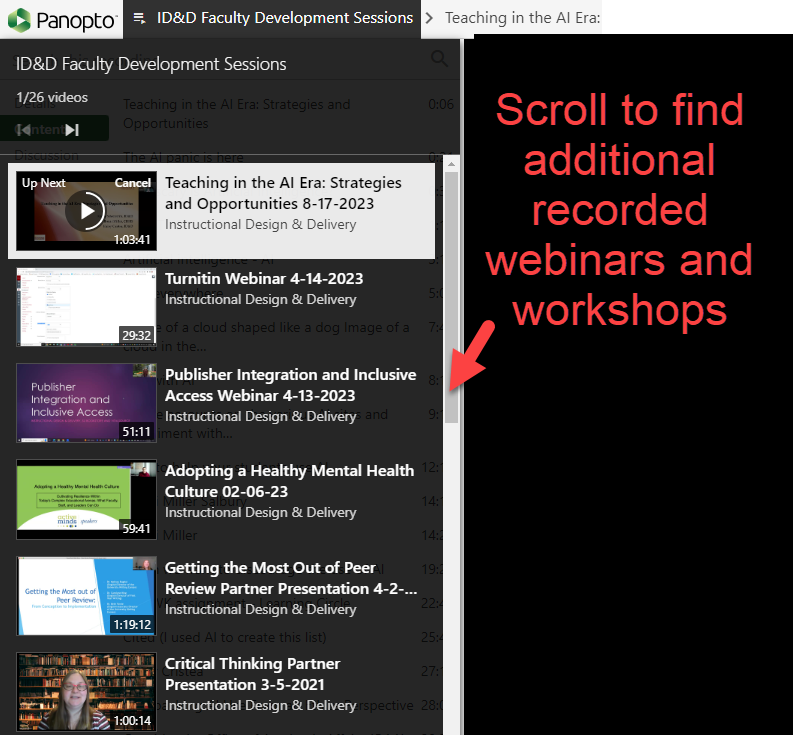
Did you know that if you go to the ID&D website and click on Faculty Development, one of the quick links, Past Recorded Sessions, leads to a faculty playlist of recorded professional development sessions? This includes past webinars, such as Dr. Vincent Genareo's presentation on "The Art and Science of Crafting Traditional-Style Assessments" that discusses effective strategies for developing assessments that support learning outcomes.


For example, when considering the types of assessment you will deliver in your course, be sure to include low-stakes activities where students can practice your assessment requirements so that they can learn from your feedback before investing in a larger-stakes assessment. When creating quiz/test/exam questions, utilize best practices, such as using equitable language, avoiding "tricking" the students and providing meaningful distracters. 


Read the ID&D article Resources for Rethinking Assessments for more information about creating inclusive assessments. Review the Faculty Development Playlist of past recordings to find Dr.  Genareo's presentation and other useful webinars. 

Panopto playlist of ID&D Faculty Development Sessions with recordings from webinars and workshops listed and a call out pointing to the scroll bar that advises "scroll to find additional recorded webinars and workshops

Turnitin: Practical and Pedagogical Uses

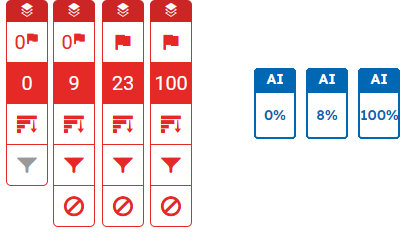
Turnitin Artificial Intelligence scores demonstrating 0%, 8%, and 100% examples.

Turnitin is a plagiarism-detection service that is available in MyClasses for use with text or file upload submissions. This tool is often used from a practical perspective to identify potential cases of plagiarism and, more recently, to flag for high likelihood of AI-generated text. 


However, you can also use Turnitin as a pedagogical tool, helping student learn writing strategies for summarizing, synthesizing and citing sources, as well as to check for grammar usage. Did you know that Turnitin has a grammar tool built in? Did you know that students can resubmit to the same assignment, allowing them to review their originality report and grammar feedback to make changes to their work before submitting a final version of the assignment?


If you are new to Turnitin or interested in learning more about Turnitin Originality and Artificial Intelligence reports, review our Turnitin webinar recording in the ID&D Past Recorded Sessions playlist to learn how to create Turnitin assignments in MyClasses through the Assignments tool, how to locate and interpret the Originality Report from SpeedGrader, how to locate and interpret the Artificial Intelligence (AI) detection report, and how to use the grammar checking using ETS® e-rater® technology to provide feedback on grammar, mechanics, usage, style and/or spelling.

Walktober!

Each October, Maryland designates this month as "Walktober" and encourages individuals to walk, Maryland's official exercise.


October is also Disability History and Awareness Month. In honor of both and the health of your body and mind, take a walk while listening to one of these podcasts:

 
Picture of an imprinted footprint in the sand with a foamy ocean wave approaching

Mid-Semester Grading Due Noon on Sunday, October 22

Why is it important to provide mid-semester grading? Grades are the number one feature that students use in MyClasses and serve as the primary feedback regarding their progression in a course. In addition, mid-semester grade reporting for all students, but especially those who are performing at a D level or below, directly affects:

  • Advisement during Program Planning
  • Outreach by the Academic Advising Center and Center for Student Achievement
  • Retention and degree completion
  • Determination before last day for regular session withdrawals on Friday, November 3, 2023 
 
Register Now!

October Workshops

Instructional Design and Delivery is offering pedagogical and instructional technology workshops for the start of the semester. Workshop descriptions and registration are available in the Faculty Development Calendar.

Thursday, October 26

  • 3-4 p.m.
    Create Your Course Design Using the Neuroscience of How Students Learn
 

Friday, October 27

  • 1-2 p.m.
    Designing PowerPoints with UDL in Mind
 

New Quizzes 30-Minute Demos 


Want to know more about New Quizzes? Join CHHS Instructional Designer Bonni Miller for a 30-minute demo and Q&A session about New Quizzes and Item Banks. Sessions will be held via Zoom:


  • Monday, October 16 • 10 a.m. New Quizzes Demo
  • Tuesday, October 17 • 10 a.m. New Quizzes Demo
  • Wednesday, October 18 • 1:30 p.m. Item Banks Demo for New Quizzes
  • Thursday, October 19 • 1:30 p.m. Item Banks Demo for New Quizzes


Register today through the Faculty Development Calendar


Need Assistance?

Ways to get help:

♦ Search our ID&D Knowledge Base

♦ Submit a Help Request

♦ Contact your Instructional Designer 

♦ Schedule a Virtual Appointment

Visit & Follow Us

Department Information:

W: www.salisbury.edu/instructionaldesign

E: suidd@salisbury.edu

O: Guerrieri Academic Commons, 220

P: 410-677-6585

View Online

Instructional Design and Delivery Youtube
Instructional Design and Delivery Twiiter
Instructional Design and Delivery Workshop Calendar