Salisbury University |  Instructional Design & Delivery Newsletter | October 21, 2025

Instructional Design and Delivery: News and Events

Call for Proposals: 16th Annual Teaching & Learning Conference

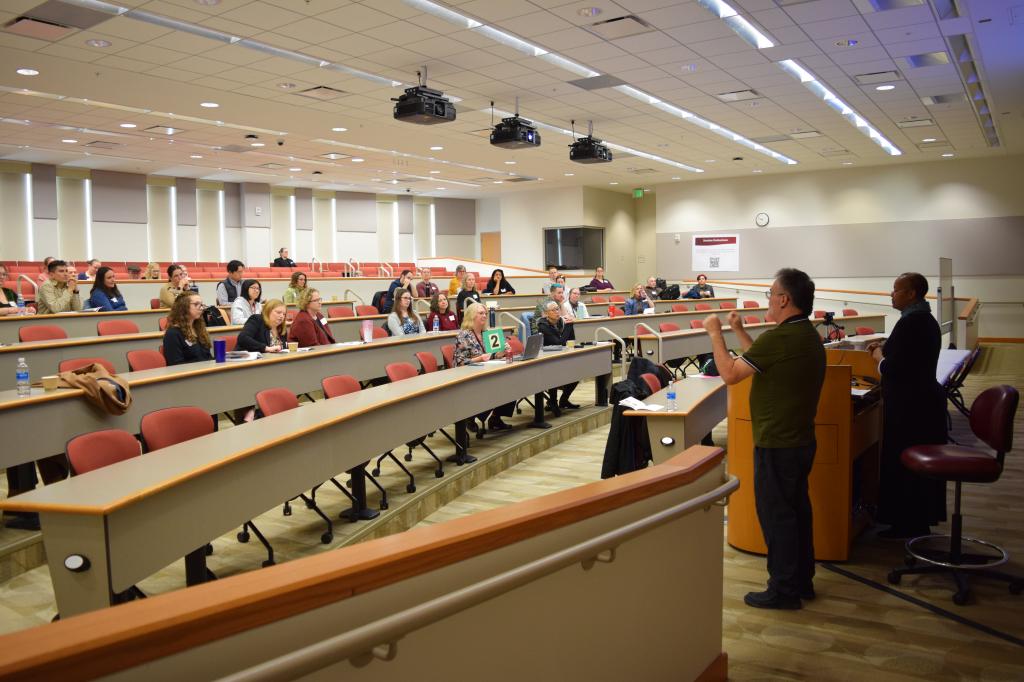
staff & faculty attend a conference in an auditorium classroom during a Teaching and Learning conference

Mark your calendars for Friday, February 6, 2026, as SU hosts our annual Teaching & Learning Conference (TLC) from 8:30 a.m. to 5 p.m.
 
The annual SU TLC brings together teacher-scholars across campus to share and discuss teaching innovations and best practices. A call for proposals is currently open for 20-minute sessions, 40-minute sessions, panel discussions (up to four presenters), or poster presentations on a variety of themes related to the scholarship of teaching and learning. 


Potential topics include, but are not limited to:

  • Current Trends (e.g., Artificial Intelligence, High-Impact Practices)
  • General Education
  • Innovative teaching strategies
  • Inclusive pedagogy (Diversity, Equity, and Belonging)
  • Culturally responsive and anti-racist pedagogy
  • Online, remote, and hybrid learning best practices
  • Promoting student wellness and sense of mattering (e.g., pedagogical partnerships of students & instructors)
  • Strategies for Student Success
 

The deadline to submit your session proposal is Monday, December 8, 2025.

Practice & Play: Polish & Present - AI Tools for Final Assignments

Practice and Play with AI

Instructional Design & Delivery (ID&D) will be hosting a series of hands-on workshops that give you the opportunity to explore AI tools for specific purposes. Designed to help you integrate emerging tools into your teaching practice, each session focuses on practical, adaptable strategies for enhancing activities you already use - making your courses more engaging, efficient, and future-ready. No prior experience with AI is required - just curiosity and a willingness to experiment.


Date & Time: October 22, 1:30 - 2:30 p.m.

Workshop 3: Polish & Present - AI Tools for Final Assignments

Location: In-person at AC 221 (ID&D Faculty Studio)

Facilitator: Dr. Janice Orcutt


Help students shine in their final projects with the support of AI! This workshop explores two powerful applications: using AI tools to help students practice and improve their presentation skills and leveraging AI tools to support peer review and revision in group work. Learn how to integrate these AI-powered strategies into your course to boost confidence, clarity, and collaboration.

Register

Mid-Semester Grading Due Wednesday, October 22

Why is it important to provide mid-semester grading? Grades are the number one feature that students use in MyClasses and serve as the primary feedback regarding their progression in a course. In addition, mid-semester grade reporting for all students, but especially those who are performing at a D level or below, directly affects:


  • Advisement during Program Planning
  • Outreach by the Academic Advising Center and Center for Student Achievement
  • Retention and degree completion
  • Determination before the last day for regular session withdrawals on Friday, November 7
 

Microsoft Teams Meetings Trainings

MS Teams logo

Join the Office of Information Technology for live training sessions focusing on the use of Microsoft Teams for meetings and webinars. Each training session lasts 45 minutes and will be available online for you to join from any location. Please register for the sessions you’re most interested in joining! The training introduces participants to the core features of Microsoft Teams Meetings. Attendees will learn how to schedule and join meetings, manage participants, share content, and use collaboration tools such as chat, reactions, and screen sharing. The session will also cover meeting best practices, including tips for engaging presentations and effective virtual collaboration.


October offerings:

Oct. 22 at 11 a.m.: Using Microsoft Teams for Meetings

Oct. 29 at 1 p.m.: Creating your own Webinar in Microsoft Teams

 National Distance Learning Week: November 3-7

Logo National Distance Learning Week 2025

In celebration of the 18th annual National Distance Learning Week (NDLW), Salisbury University instructional designers are offering webinars related to teaching and learning in online, remote, and hybrid courses (but can also be applied to traditional courses).


UDOIT and Canvas: Accessibility and AI-Enabled Tools

Monday, November 3 at 2-3 p.m. (EST)  Register


Learning Activities that Build Community in Remote Courses

Tuesday, November 4 at 10-11 a.m. (EST)  Register


Practice & Play: Plan & Produce - AI for Smarter Course Prep 

Wednesday, November 5 at 2-3 p.m. (EST)  Register: In-person or virtual


Teaching Beyond the Screen: How AI Can Extend Your Presence Online 

Thursday, November 6 at 10-11 a.m. (EST) Register


AI Literacy and Critical Thinking - Preparing our Students for an Evolving Workforce

Friday, November 7 at 9-10 a.m. (EST)  Register

The United States Distance Learning Association (USDLA) is hosting a free, virtual, week-long NDLW conference, November 3-7, meant to:

  • generate greater awareness and appreciation for distance/digital learning
  • spotlight applications in K-20, telehealth, corporate, and government/military
  • discuss current issues and emerging trends
  • highlight best practices
  • recognize leaders in the field
 

Visit https://usdla.org/ndlw/ for the conference schedule and registration.

New SpeedGrader Feature: Multi-Select Section Filter with Checkboxes

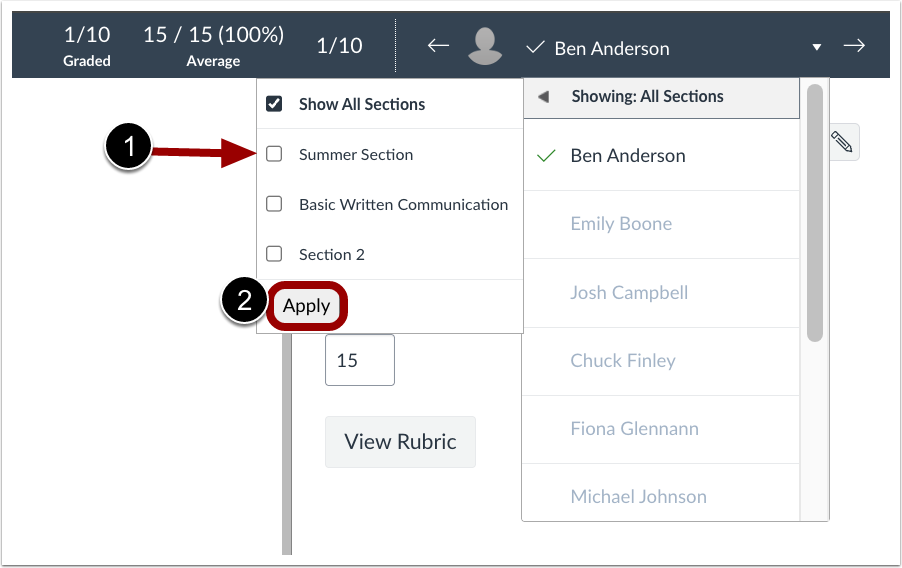
Multi-Select filter with the "Show All Sections" option checked and three sections available to be checked if only one section is desired. An Apply button is also highlighted.

Previously in SpeedGrader, you could only view one section at a time. Switching sections in SpeedGrader was taking too many clicks and causing unnecessary student submission reloads. To reduce clicks and load times when switching between sections in SpeedGrader, there is a new section filter at the top of the student dropdown menu.


With the multi-select checkboxes added to SpeedGrader, instructors can now filter submissions by multiple sections at once, making it easier to manage and grade students across different groups. The How do I use SpeedGrader? guide has been updated to include Sections Filter details.

thing

Need Assistance?

Ways to get help:

♦ Search our ID&D Knowledge Base

♦ Submit a Help Request

♦ Contact your Instructional Designer 

♦ Schedule a Virtual Appointment

Visit & Follow Us

Department Information:

W: salisbury.edu/instructionaldesign

E: suidd@salisbury.edu

O: Guerrieri Academic Commons, 220

P: 410-677-6585

Instructional Design and Delivery YouTube
Instructional Design and Delivery  X (formerly Twitter)
Instructional Design and Delivery Workshop Calendar
Salisbury University Logo

SU is an Equal Opportunity/AA/Title IX university and provides reasonable accommodation given sufficient notice to the University office or staff sponsoring the event or program. For more information regarding SU's policies and procedures, please visit salisbury.edu/equity.


View Online