Salisbury University |  Instructional Design & Delivery Newsletter | September 14, 2021

Instructional Design & Delivery

News & Events

USM Fall 2021 Faculty Showcase (Sept. 30 - Oct. 1)


Thursday-Friday, September 30-October 1, the Kirwan Center for Academic Innovation hosts a virtual faculty showcaseSilver Linings: Lessons Learned from Teaching during the Pandemic. Faculty, individually and with colleagues, share challenges, triumphs, lessons learned and new approaches for supporting quality teaching and learning. Sessions explore novel instructional approaches, active learning pedagogies, student engagement practices, assessment techniques, communication strategies, and faculty-staff and faculty-student partnerships. 


The Fall Faculty Showcase is open to all faculty and staff of USM institutions, Morgan State University and St. Mary's College of Maryland. There is no cost to attend. The following SU faculty and student are participating in concurrent sessions and lightning talks throughout the event: 

  • Alison Dewald, Mindy Howard, Joshua Sokoloski, & Cynthia Watson; Chemistry 
  • Kayla Sealover; Undergraduate Research Student in Chemistry
  • Carolina Bown, Jennifer Cox, Chrys Egan, & Paul Scovell; Communication 
  • Brittany Foutz; Conflict Analysis & Dispute Resolution 
  • James Fox; Education Leadership 
  • Michael Koval; Accounting & Legal Studies 
  • Sarah Surak; Political Science & Environmental Studies 
  • Echo Weaver; Psychology 
  • Letha Moszer, Susan Park, & Kathleen Arban; Social Work 
 

Registration is open and the schedule, created on Sched, is now accessible via the Kirwan Center’s Showcase webpage under the Schedule tab. Following your registration, you’ll get an email to receive full access to the Sched site and will be able to create a custom schedule of sessions you’d like to attend, search the program, and view participants and presenters. This is also where the URLs for the individual sessions will be posted just before the event. 


Please contact Dr. Jessica Clark or Melissa Thomas if you have questions or need additional information. 

Panda Pros

Canvas LMS Users title

Looking to have some questions about MyClasses answered as you update your fall course for the semester? Through the month of September, Canvas representatives – Panda Pros – are available to schedule FREE 25-minute meetings with to answer the Canvas questions you may have! 


Some examples of questions you can meet with them to discuss include: 

  • Module Best Practices - How do I create consistency in modules? How do I build reusable content? How do I use module prerequisites? 

  • Rich Content Editor - How do I use the HTML Editor? How do I add text headers, alt-text and other accessibility features? How do I integrate audio and video? 

  • Accessibility and Course Design - How do I run and use the Accessibility Checker? Can I validate/check broken links? How do I add captions to Studio videos? 

  • SpeedGrader - How do I use the annotation tools? What is speech-to-text feedback? How should I utilize rubrics? 

  • Strategies for Formative Assessments - How do I use strategies like exit tickets and group work check-ins to drive better formative assessments? 


These sessions are currently offered for a limited time during the month of September, from 6 a.m.-5:30 p.m. MDT (8 a.m.-7:30 p.m. EST) Monday-Friday, 6-11:30 a.m. MDT (8 a.m.-1:30 p.m. EST) Saturday, and noon-5:30 p.m. MDT (2-7:30 p.m. EST) Sundays. These sessions offer additional support outside of ID&D's normal operating hours; book a session and try it out! 

SUCCEED Course Spotlight - Backward Design

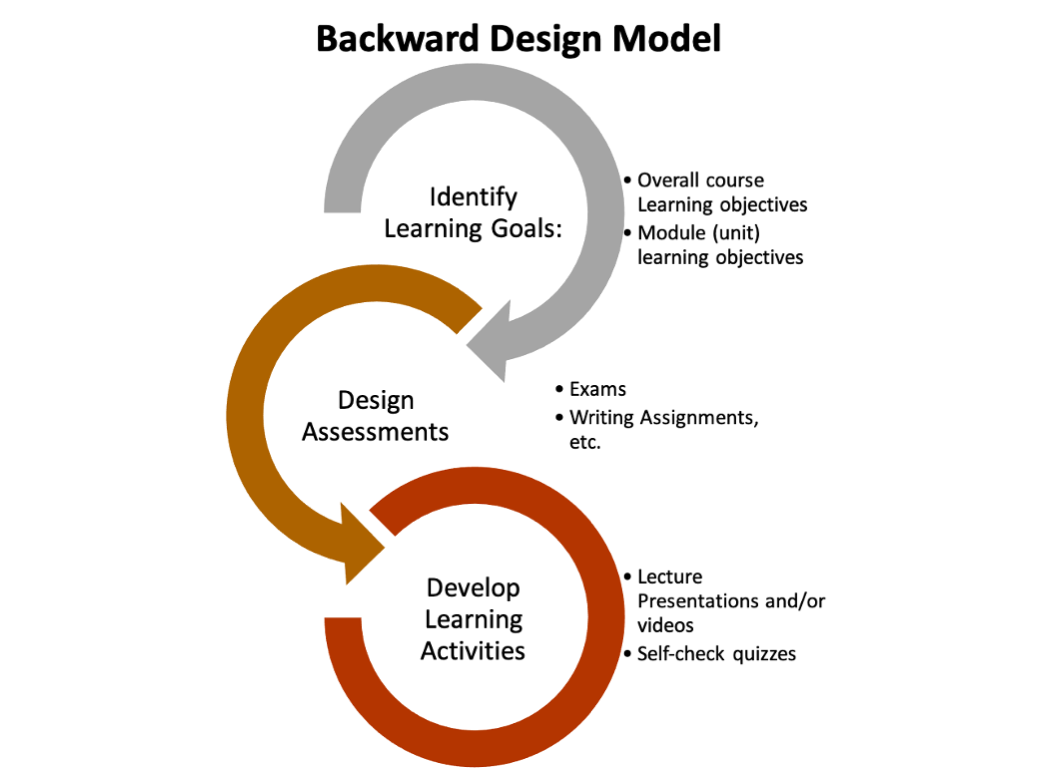
Backwards Design Model. 1. Identify Learning Goals: overall course learning objectives and module (unit) learning objectives. 2. Design Assessments: exams, writing assignments, etc., 3. Develop Learning Activities: lecture presentations and/or videos, self-check quizzes.

ID&D introduces a free, self-paced, professional development opportunity on the Backward Design model as a way for faculty to examine their courses with the end result in mind. Whether you are developing a new course or examining current courses for alignment with the University's Student Learning Outcomes, this course provides guidance on how to align content, activities, and assessments to your desired outcomes. 

New in MyClasses - Discussions & Annoucements

Canvas is consistently updating its features to meet the needs and requests of educators across the world. Such requests have led to a redesign of the Discussion feature. The Discussions Redesign is intended to provide an enhanced experience for course discussions; however, because Announcements are based off of the same tool as Discussions, all Announcements will also inherit the applicable enhancements. 


Current updates to Discussions include the following: 

  • New replies now display at the top of the first page of post, instead of the bottom of the last page. 
  • Users can now sort replies from newest to oldest or oldest to newest, if they please. 
  • The toolbar has been moved to the very top of the page and thread. 
  • Using a button, users can now jump directly to the top of any page quickly. 
 

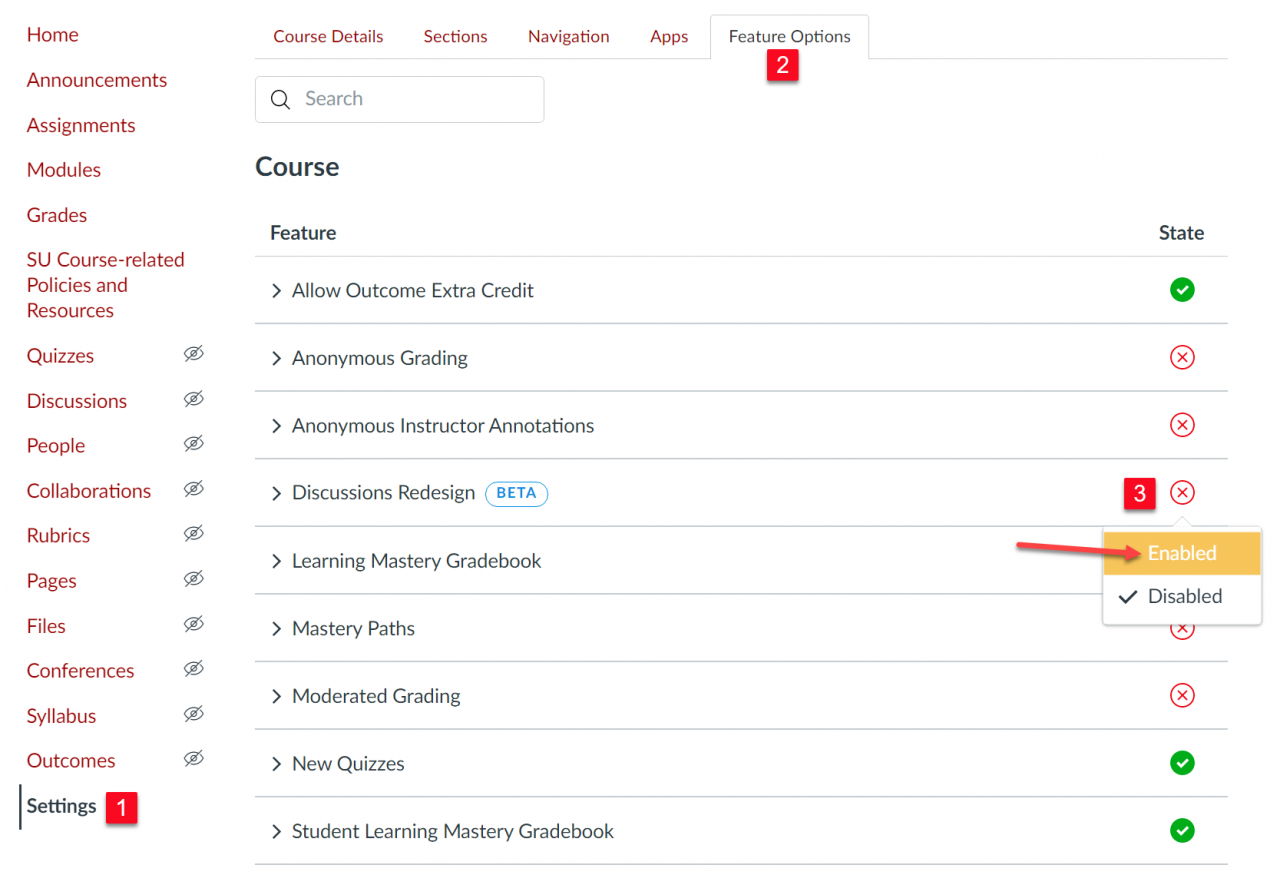
 Discussions Redesign is currently a beta feature, meaning that you will need to enable it in your course in order to display the enhancements for your course discussions. To enable Discussions Redesign in your course, click on Settings from the course menu (1), then click the Feature Options tab (2), and then click the disabled icon in line with "Discussions Redesign" to open an Enable/Disable dropdown menu and select Enable (3). A checkmark under the "State" column will verify that you have enabled the beta version of Discussions Redesign in your course. 

The Feature Options menu under Settings with the Discussions Redesign "Enable" option highlighted.

New Quizzes Replaces Classic Quizzes Summer 2022

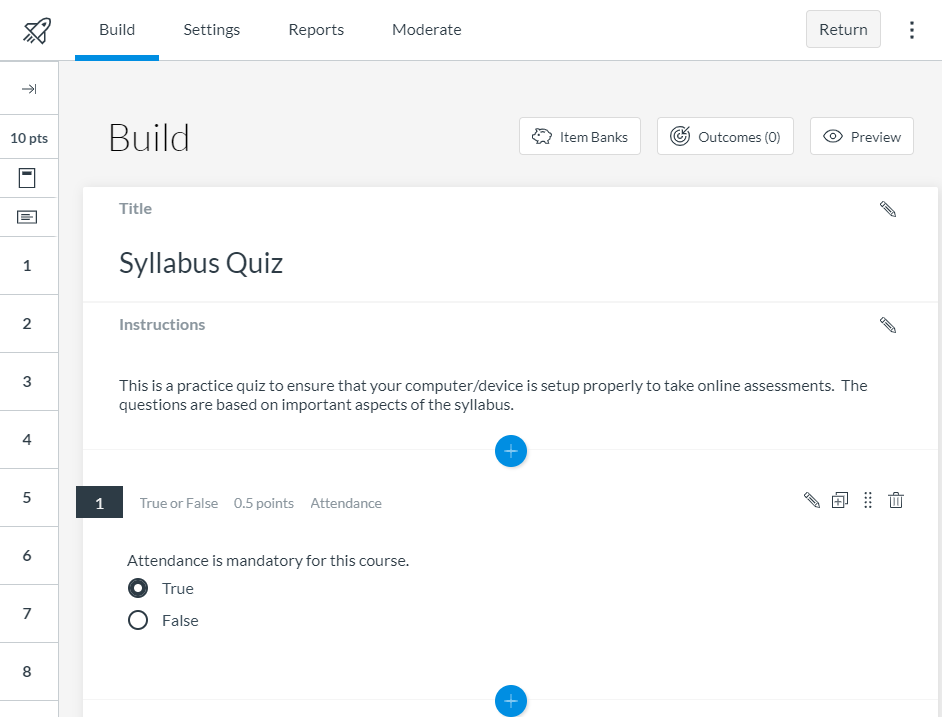
New Quizzes Build layout in MyClasses

Classic Quizzes is being replaced with the New Quizzes functionality beginning summer 2022. New Quizzes offers additional question types, additional assessment delivery options, the ability to share questions banks (now called item banks), and the ability to setup accommodations for students for all assessments in a course. A comparison of Classic Quizzes and New Quizzes features is available in the Canvas Community.


Between now and its full implementation, faculty can enable New Quizzes in their course and use both New and Classic Quizzes. Faculty are encouraged to begin moving their assessments from Classic Quizzes to New Quizzes. Watch ID&D's New Quizzes Information Webinar from May 24 for more information about New Quizzes.

Have questions? Want to know more about New Quizzes? Join ID&D for virtual drop-in sessions every other Friday at 10 a.m. eastern. Upcoming sessions:

  • Friday, September 17
  • Friday, October 1
 
QR code leading to the 2021 Faculty Professional Development Needs Assessment

Faculty Needs Assessment

During Faculty Development Day on August 25, Dr. Jessica Clark, assistant provost for faculty success, introduced a Faculty Needs Assessment to help shape the future of a new center for faculty innovation and wellness.

We need to hear from as many faculty as possible! Please complete the 2021 Faculty Professional Development Needs Assessment and help shape our future faculty center.

Need Help?

Contact an Instructional Designer.


Review our ID&D Knowledge Base for instructional software how-tos and pedagogical best practices. (SU Login required).


You can also search the IT HelpDesk Knowledge Base, such as for information about Zoom and Office 365.

Can't find the information you need in the Knowledge Base?


Please use the I Need Help? option to submit a Help Request in the ID&D Support Center.


Drop into our Virtual Office Hours:
Monday-Friday, 8 a.m.-4:30 p.m.


Visit & Follow Us

ID&D Office: 

Guerrieri Academic Commons, Room 220


Office Hours: 

Monday-Friday - 8 a.m.-4:30 p.m.


Faculty Studio

Guerrieri Academic Commons, Room 221


Department Information:

W: www.salisbury.edu/instructionaldesign

E: suidd@salisbury.edu

P: 410-677-6585

View Online


url    youtube
Salisbury University Logo

SU is an Equal Opportunity/AA/Title IX university and provides reasonable accommodation given sufficient notice to the University office or staff sponsoring the event or program. For more information regarding SU’s policies and procedures, please visit www.salisbury.edu/equity.