Salisbury University |  Instructional Design & Delivery Newsletter | November 3, 2020

Instructional Design & Delivery

News & Events

Faculty Learning Community

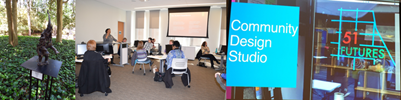
Student artwork at Salisbury Zoo, FLC discussion, Design Activism and 51 Futures presentations


Join one of our Learning Communities. FLCs are a cross-disciplinary faculty and staff group of 8 to 12 members engaging in an active, collaborative, year-long program with a curriculum about enhancing teaching and learning and with frequent seminars and activities that provide learning, development, interdisciplinary, the scholarship of teaching and learning, and community building. New FLCs for fall 2020 include: 

  • Ethics Across the Curriculum 
  • Technologies of Identity: A Study Group of SU Humanists and Scientists 
 

Strategies for Including Diversity & Inclusion in Any Course

From 2016 to 2020, the Social Justice, Equity and Teaching Transformation (SETT-SU) Faculty Learning Community gathered regularly to discuss classroom concerns and University-wide issues related to diversity. Together, the SETT-SU FLC and Research and Instructional Librarian Angeline Prichard developed a Diversity and Inclusion Resources for Curricula: General Teaching Resources LibGuide to broaden resource-sharing efforts for any faculty interested in enhancing students' learning in your discipline while incorporating diversity and inclusion. Watch the Diversity and Inclusion Library Guide video for more information.

National Distance Learning Week - November 9-13

National Distance Learning Week logo

The coronavirus pandemic has thrust many educational organizations into various levels of distance learning. Each year in November, we celebrate National Distance Learning Week. We invite you to explore the FREE NDLW virtual event, From Surviving to Thriving: Rocking the New Normal, hosted by the U.S. Distance Learning Association. Register for free webinars throughout November 9-13. Interesting sessions include:

  • Focus on Online Collaboratories: Approaches to Building Community Remotely
  • Focus on Open Education Resources and Digital Textbooks
  • Focus on Virtual Labs
  • Focus on Proctoring (Panel Session)
  • Focus on Faculty
 

Combine Section Request Form

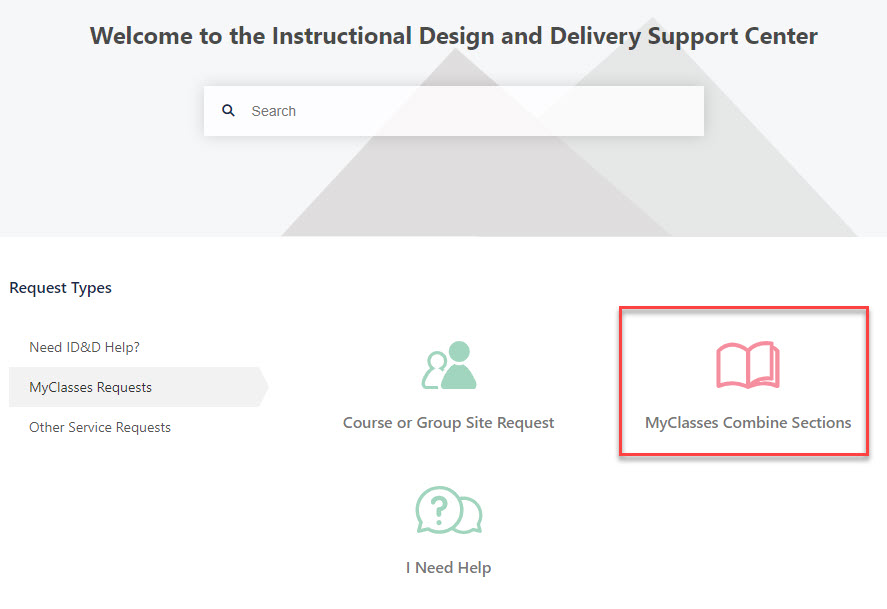
ID&D Support Center MyClasses Request page with the Combine Sections option highlighted

Faculty interested in combining multiple sections of the same course – undergraduate with graduate courses or cross-listed disciplinary courses – can use the MyClasses Combine Sections request located under MyClasses requests section of the ID&D Support Center.  
 
Faculty participating in the Inclusive Access textbook program should request sections be combined at least four weeks prior to the start of the semester.

Zoom Tip for One-on-One Faculty-Student Discussions

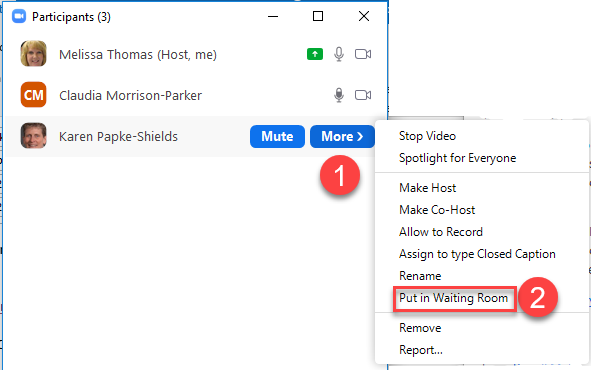
Zoom Participant "More" option menu with "Put in waiting room" selected

Need to talk to students after class during your remote session? Want to have confidential conversations? If you were recording your lecture for post-class viewing, first you will want to stop recording. Communicate to students that you will talk to them individually and ask them to patiently wait in the Waiting Room. Then within the Participants area of Zoom, place each student into the Waiting Room until you are ready to talk to that person individually. Thank you to Dee Morrison-Parker in the Biological Sciences Department for this tip suggestion.

ID&D Workshops Offerings

ID&D is offering workshops in November that focus on CidiLabs Design Tools, MyClasses Gradebook, Panopto, Respondus and Office 365 and also is hosting a focused Q&A session with MyClasses Tips and Tricks. The CidiLabs Design Tools, MyClasses Gradebook, Panopto, Respondus and Office 365 workshops require registration, while the Q&A session is more informal and therefore doesn't require registration.


To view more details about each session and to register for one or more workshops, please go to the Faculty Development Calendar.

Using Respondus for Creating Quizzes & Exams

Friday, November 6 ● 10-11 a.m. (EST) 


MyClasses Organization & Management Q&A 

Friday, November 6 ● 1-2 p.m. (EST) 


Panopto Part II 

Friday, November 13 ● 10-11 a.m. (EST) 


MyClasses Communication & Feedback Q&A 

Friday, November 13 ● 1-2 p.m. (EST) 


MyClasses Gradebook 

Friday, November 20 ● 10-11 a.m. (EST) 


Office 365 

Friday, November 20 ● 1-2 p.m. (EST) 

Need Help?

Contact an Instructional Designer


Review our ID&D Knowledgebase for instructional software how-to’s and pedagogical best practices. (SU Login required)


You can also search the IT HelpDesk Knowledgebase, such as for information about Zoom and Office 365.

Can't find the information you need in the Knowledgebase?


Please use the I Need Help? option to submit a Help Request in the ID&D Support Center.


Drop into our Virtual Office Hours, Monday-Friday, 8 a.m.-4:30 p.m.


Visit & Follow Us

ID&D Office: 

ID&D is working remotely and is not in the office for the fall 2020 semester. However, the Faculty Studio is still be available to faculty during the hours that the Guerrieri Academic Commons is open.


Faculty Studio

Guerrieri Academic Commons 221


Department Information:

W: www.salisbury.edu/instructionaldesign

E: suidd@salisbury.edu

P: 410-677-6585*

*Voicemails are converted to emails while ID&D works remotely.

View Online

url    youtube
Salisbury University Logo

SU is an Equal Opportunity/AA/Title IX university and provides reasonable accommodation given sufficient notice to the University office or staff sponsoring the event or program. For more information regarding SU’s policies and procedures, please visit www.salisbury.edu/equity.