Salisbury University |  Instructional Design & Delivery Newsletter | August 1, 2022

August 24 - Keeping Balance: Engagement and Self-Care

Register now!

Mark your calendars and plan to attend in-person the annual Faculty Development Day 8:30 a.m.-noon Wednesday, August 24, in the Guerrieri Academic Commons Assembly Hall (Room 462), with the theme Keeping the Balance: Engagement and Self-Care.


After the past few difficult years, we want to put the focus back on bringing balance to our lives while building engagement with colleagues, community and the academy. Please join us as we come together as a community to reengage and explore ways to maintain professional and personal self-care.


The format for this year will be a bit different. We will begin with concurrent mindfulness sessions across campus: yoga, meditation and sound therapy (pre-registration requested), prior to convening at the Assembly Hall in the Guerrieri Academic Commons at 9 a.m. for breakfast and conversations.

Welcome and introductions will begin at 9:30 a.m., and organizers are pleased to welcome this year’s keynote speaker, Dr. Heidi Fritz, associate professor in psychology, with a discussion on "Embracing Our Mental Health."

Following the lecture, we will use café-style discussions to allow faculty members to exchange ideas and learn about opportunities for engagement across campus and the community. These discussions will be facilitated by select Faculty Learning Communities and campus-based groups. Discussion groups will focus on community and faculty engagement, and dependent care. 


Registration is required for the 2022 Faculty Development Day and we look forward to seeing you there. 

Rethinking Assessments

When designing a course, assessments are key to determining if students are successfully achieving disciplinary competency and therefore meeting course learning objectives. A historically common form of assessment is a forced response assessment; however, this type of assessment tends to demonstrate a students' ability to memorize information for short-term use rather than an applicable understanding of the content. Faculty are encouraged to break away from forced-response tests, or to at least rethink how these types of tests are structured, to support successful student application of course information.

Authentic assessments are an ideal way to break away from forced response assessments. Authentic assessments replicate real-world activities such as role-playing different perspectives in the field or having students develop a piece of writing/reporting that is common to the discipline (e.g., a budget in Excel, a business plan, a literature review, etc.). Not only do authentic assessments provide students with practice in real-world professional skills, but for those preparing online assessments, these type of assessments reduce concerns about cheating in unproctored settings. You can also review our Tips for Enhancing Test Security in MyClasses article for more resources about reducing the opportunity for cheating in online assessment.


If your discipline benefits from forced response question types, or if your assessments are grounded in publisher content, our Resources for Rethinking Assessments article provides considerations for creating quality forced-response questions and expanding the questions to require the student to use specific information from your lectures and your course materials.

August Special: Syllabus Tune-Up!

Tools and gears

Just in time for the start of the semester, ID&D instructional designers are available to review your course syllabi. Students are more engaged and achieve more significant learning gains when they perceive your course’s climate as inclusive, positive and supportive. So, please reach out to your instructional designer liaison and we will be happy to review your syllabi and help you set the stage for an engaging semester.  

The University provides a central course-related (e.g. syllabus) policies website, which includes institutional policies and procedures related to academic misconduct, misappropriation of course-based intellectual property, emergency absence policy, registration add/drop/withdraw period, student accommodations as well as student support resources. A link to the SU Course-Related Policies and Resources is included on every course menu within the MyClasses learning management system.


Fall 2022 Updates: Explicit references to COVID have been removed. Faculty are encouraged to use the following updated statement in their syllabi:

University Course-Related Policies: Salisbury University expects that all students have read and understood all of the Course-Related University Policies and Resources and thereby agree to honor these standards. Important course-related policies and resources include, but are not limited to:

  • Course registration add/drop/withdraw period
  • Academic misconduct policy
  • Student accommodations
  • University resources such as the SU Libraries, Disability Resource Center, Center for Student Achievement, University Writing Center and SU Cares.
 

The [INSERT ACADEMIC DEPARTMENT/UNIT] considers academic misconduct as a serious offense and ALL incidences are subject to disciplinary action including, but not limited to, separation from the University.

Start-of-the-Semester Checklist

Review the Start-of-the-Semester Checklist for information about setting up your MyClasses course, which includes:   

  • Statement to include in syllabus to reference standard University Course-Related Policies and Resources.
  • Tips for faculty to setup their MyClasses course for the first time.  
  • Instructions and video tip on importing course content from a previous semester.   
  • After importing content, setting up course to reuse Panopto recordings, refresh Respondus LockDown Browser settings and set up Turnitin Assignments with the Canvas Plagiarism Framework tool.   
  • And more …
 

Courses in MyClasses are set to open for students one week prior to the start of the semester, provided that the course has been published by the instructor, as follows: 

  • Fall 2022 Regular and 7-Week 1 Sessions: Monday, August 22
  • Fall 2022 7-Week 2 Session: Wednesday, October 12
 

Publisher Integrations and Inclusive Access

Several major textbook publishers provide the ability to integrate their content and services with MyClasses courses. For example, assignments provided by the publisher can be linked from within a course module, and grades from the assignment will be automatically pushed back to the MyClasses gradebook.


Inclusive Access is a program coordinated by the SU Bookstore to provide access to course materials as soon as the MyClasses course opens to students (typically one week prior to the semester). With Inclusive Access, there are two types of course materials:

  1. eBook - Access to a digital copy of the assigned textbook through the VitalSource eBook reader.
  2. eBook and Courseware: In addition to the digital copy of the assigned textbook, students will also have access to various instructional materials and activities (Courseware) related to the assigned textbook selected by the instructor.

After faculty elect to participate in the Inclusive Access program, setup is required to connect their MyClasses course with selected publisher instructional materials and activities (Courseware) for students to access the selected materials.


ID&D is ready to help with publisher integrations and/or Inclusive Access and invites faculty to the following sessions:

  • McGraw Hill Integrations:
    • Wednesday, August 10 • 2-3 p.m.
    • Thursday, August 11 • 10:30 a.m.-Noon
     
  • Cengage Integrations:
    • Wednesday, August 10 • 9-10 a.m.
    • Thursday, August 11 • 2:30-3:30 p.m.
     
  • Pearson Integrations:
    • Wednesday, August 10 • 10:30-11:30 a.m.
    • Thursday, August 11 • 1-2 p.m.
     
  • Any Publisher or IA Setup:
    • Monday, August 15 • 2-4 p.m.
    • Tuesday, August 16 • 10 a.m.-Noon


No registration required, faculty can drop in any time during the scheduled time and will be helped in a first-come, first-served system. Locations are available on the Faculty Development calendar for both in-person and virtual options.


For more information please visit the ID&D Inclusive Access and Publisher Integration Knowledge Base articles.

Register Now!

August Workshops

Instructional Design & Delivery is offering workshops on MyClasses (quizzes, gradebook, assignments, course organization), Turnitin (plagiarism prevention service), TurningPoint (clickers), Panopto (lecture/video capture) and Teams/Office 365 for course delivery.

We also offer after-hours Quick Start workshops for adjunct faculty! Take some time to brush up your skills, explore new features and learn some best practices for your course.


Our August 2022 workshops are offered in person in the Faculty Studio in the Guerrieri Academic Commons, Room 221 (15-seat capacity), unless otherwise indicated with an asterisk, which will be held virtually. For those registering to attend in person, faculty/staff with active SU accounts should select SU Login to enroll in a workshop; incoming faculty/staff without an SU account should use the Non-SU option to enroll in a workshop. For workshop descriptions and registration information, please refer to the Faculty Development Calendar.

Monday, August 15

  • 9-11 a.m.
    Getting Started with MyClasses Canvas

  • 1-3 p.m.
    Creating & Managing Online Assessments (New Quizzes)

  • 5-7 p.m.
    MyClasses Quick Start
 

Tuesday, August 16

  • 9-11 a.m.
    Assignments, Discussions & Groups in MyClasses


  • 2-3 p.m.
    Actively Engage Students in the Classroom with TurningPoint
 

Wednesday, August 17

  • 9-11 a.m.
    Creating & Organizing Content

  • 1-2 p.m.
    Office 365 & MyClasses Course Content

  • 2:30-4:30 p.m.
    Universal Design for Learning (UDL) for Inclusive Classrooms
 

Thursday, August 18

  • 9-11 a.m.
    Recording Video & Lectures with Panopto

  • 1-2 p.m.
    Turnitin Originality Report

  • 5-7 p.m.
    MyClasses Quick Start
 

Friday, August 19

  • 9-11 a.m.
    Give Your Canvas Courses a Boost – With Design Tools

  • 1-3 p.m.
    Mastering the MyClasses Gradebook
 

Tuesday, August 23

  • 5-7 p.m.
    MyClasses Quick Start*
 

Wednesday, August 24

  • 5-7 p.m.
    MyClasses Quick Start*
 

New in MyClasses - For Fall 2022

Canvas (the company behind MyClasses) is consistently updating its features to meet the needs and requests of educators and students alike. Such requests have led to a redesign of the students' view and access to submission details, the ability for anonymous discussion posts, and enhanced filters in the Gradebook. Students also have the ability to export content to ePub for viewing content offline.

Student Assignment Enhancements

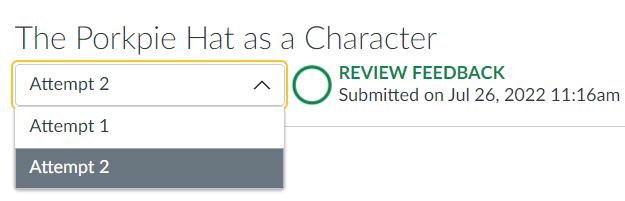
Previously, students were only able to see their most recent submission and feedback on an assignment in MyClasses.

Dropdown menu showing two submission attempts to choose from.

Now, students are able to see all previous submissions to the assignment, as well as feedback left on each submission attempt. This is useful for those who allow students to resubmit an assignment more than once for feedback and revision during a course or for those who wish to create a recurring assignment that students submit updates to throughout the semester. This video tip about Reviewing Instructor Feedback demonstrates how students can view feedback on multiple attempts; you can share it with your students for guidance!


Note: This feature is not currently compatible with Peer Reviews; at this time, only the most recent submission attempt and feedback will be available to students who have submitted multiple attempts for a Peer Review assignment.

Discussions/Announcements Redesign - Anonymous Discussion Posts

If you have enabled and are using the Discussions/Announcements Redesign feature in your course, you will have a new option in your Discussion settings that allow you to make discussion posts anonymous. By default, student names and profile pictures display in discussions (the Off setting shown below). To enable anonymous discussions and hide student names and profile pictures, select the click the option the enable anonymous discussion. Then you can choose to the anonymity level you would like to allow students, either Partial, where students can choose whether or not to display their name and profile picture with their post, or Full, where student names and profile pictures will be hidden.

Anonymous Discussion option in Discussion Settings, with selection buttons for either "Off, Partial, or Full"

Note: Anonymous discussions are not compatible with graded or group discussions.

Enhanced Gradebook Filters

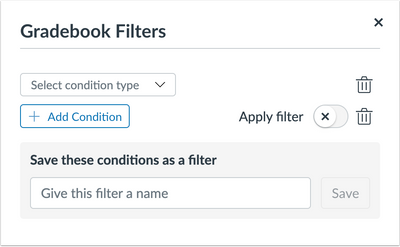
Enhanced filters are available in the Canvas gradebook that allow you to create filters that can be saved or used one time. This provides you the opportunity to personalize filters using specific parameters you need to reference or track frequently.

The gradebook filter option with a dropdown menu to select a condition type and add conditions to the type.

You can create a custom filter by selecting condition types (Assignment Group, Module, Section, Student Group, Grading Period, Submission, Start Date and End Date) and conditions to each condition type. Once you have set up the filter, you can give it a name for future use. 


To enable this feature for your course, click on Settings, then Feature Options. Find the Enhanced Gradebook Filters feature option and click the X to open a dropdown menu to enable the feature. For more information, review the Canvas article about creating your own gradebook filter.

ePub Exporting 

ePub exporting has been enabled as an option for you to turn on in your course. If you turn on the ePub exporting option in your course, this will allow users to download and view your course offline as an ePub file. Enabling this feature for you course can support access to course materials for students with limited internet availability. However, ePub content is for offline viewing only; users cannot interact with course content directly, such as completing an assignment or viewing any submissions. Any files that aren't supported in the ePub format, such as file attachments or PDFs, can be downloaded to be viewed in the file's native environment.


To enable this feature in your course, click on Settings, then Feature Options. Find the ePub Exporting feature option and click the X to open a dropdown menu to enable the feature. You can enable and disable the feature in your course as needed.

The enable/disable menu in the ePub Exporting feature option under course settings with the option Enabled.

For more information about ePub exports, please view the Canvas guide to either learn about it from an instructor perspective or student perspective.

Panopto Retention Policy

Starting June 1, 2022, Panopto video recordings that have not been viewed within five years will be marked for deletion and the video will be placed in a recycle bin for 90 days. As we role out this new process, faculty and staff will be notified by email regarding videos that have been identified for deletion. Individuals will have the following options:

  • Watch the video to retain the recording in Panopto.
  • Confirm the video can be deleted or archived.
  • Download the video for safekeeping.
 

More information is available in the Panopto Retention Policy article in ID&D's Knowledgebase (SU login required).


UMES Virtual Innovations in Teaching & Learning Conference

University of Maryland Eastern Shore Innovations in Teaching & Learning

Whether we refer to it as exhaustion, burnout, antipathy or disengagement, or whether we prefer to see the other side of it as resilience, re-sparking, wellness and re-engagement, we know that our mission to support students takes a toll on our mental, emotional and sometimes physical health. The organizers of the University of Maryland Eastern Shore Innovations in Teaching & Learning Conference (ITLC) recognize this as one of the most compelling issues in the education profession right now, and invite you to join them to discuss these topics.


This FREE two-day conference includes plenary sessions on Day 1 and concurrent sessions on Day 2 that are centered around the topic of faculty wellness and wellbeing.


The UMES Center for Teaching Excellence (CTE) invites faculty, instructional staff and colleagues to register for the fifth Innovations in Teaching & Learning Conferenceheld virtually Wednesday-Thursday, August 17-18. Graduate students, teaching assistants and contingent faculty colleagues are encouraged to join as well.

Proposals for this conference are open until Friday, August 5. If you have a topic you would like to share for a concurrent session at this event, consider submitting a proposal.

Register Now

Need Assistance?

Ways to get help:

♦ Search our ID&D Knowledge Base

♦ Submit a Help Request

♦ Contact your Instructional Designer 

♦ Schedule a Virtual Appointment

Visit & Follow Us

Department Information:

W: www.salisbury.edu/instructionaldesign

E: suidd@salisbury.edu

O: Guerrieri Academic Commons, 220

P: 410-677-6585

View Online

Instructional Design and Delivery Youtube
Instructional Design and Delivery Twiiter
Instructional Design and Delivery Workshop Calendar