Salisbury University |  Instructional Design & Delivery Newsletter | December 14, 2021

Instructional Design & Delivery

News & Events

January 26: All Aboard the General Education Train

Train heading forward on tracks in a forest.

Wednesday, January 26 • 11 a.m.-1 p.m.

Guerrieri Academic Commons, Assembly Hall & Virtual


Jump on board for a journey with the General Education 2024 program and planned implementation. This session helps bring all faculty up to speed on the details of SU's new General Education model. Topics include:

  • how student learning outcomes are the foundation of our new General Education model
  • details as to how the implementation process will proceed
  • discussion about what professional development will be needed and offered to get everyone prepared for the fall 2024 rollout
 

Attend this session to ask your burning questions about the implementation process of this important transformation of our undergraduate curriculum.


Event Registration

Video Tip: End-of-Semester Gradebook Tips  

When preparing your gradebook for the end of the semester, please review the End-of-Semester Top 5 Gradebook Tips video for information about:   

  • Ensuring your assignments are in the correct assignment groups  
  • Enabling student What-If Score option and hiding gradebook totals  
  • Addressing missed student assignments  
  • Performing final grade override  
  • Exporting grades  
 

To review the gradebook in more detail, you can watch the Gradebook video tip. Please contact your department's instructional designer if you have any questions or need any assistance preparing your gradebook for finalizing grades!  

MyClasses Access to Courses with Incompletes

A question ID&D receives at the end of each semester is what happens to a course in MyClasses when a student has an incomplete? Can course access be extended?


Yes! Any course with a documented incomplete or extension in GullNet will automatically be extended to either:

  • the mid-semester date of the next full semester, established by the Registrar's Office or
  • a date the faculty member requests through the Incomplete Grade Extension form.
 

ID&D runs a weekly report between GullNet and MyClasses to update the section dates to provide continuity of access to the course. Extended access is applied to the entire course and not just for the individual student(s) receiving an incomplete.

New Quizzes: Turned On For Everyone December 20

Starting with the summer 2022 session, the Quizzes feature in MyClasses will change! Quizzes will be replaced with the New Quizzes functionality and the Classic Quiz builder will no longer be available to create assessments. Starting Monday, December 20, 2021, New Quizzes will be turned on for all courses. Faculty will have the option to continue using Classic Quizzes and New Quizzes in the winter and spring sessions. This is a great opportunity to begin transitioning assessments to New Quizzes, while keeping your existing assessments in Classic Quizzes.


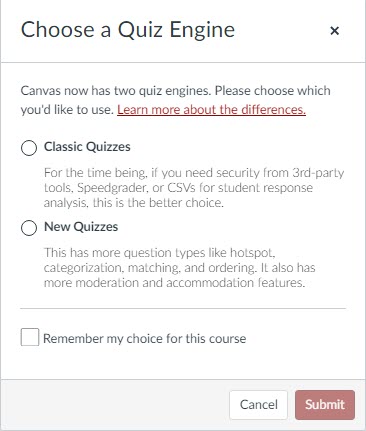
When creating a new assessment, a prompt will display to choose which quiz engine you want to use when you click the Add New Quiz button in MyClasses.

Choose a Quiz Engine Prompt to select either Classic Quizzes or New Quizzes and then select Submit button in lower right corner.

Why start building in New Quizzes now?


New Quizzes offers additional question types, additional assessment delivery options, the ability to share questions banks (now called item banks) and the ability to setup accommodations for students for all assessments in a course once.


Stay informed through ID&D's Quizzes Knowledgebase article for transition timeline, comparison of features and methods to convert existing assessments.

TurningPoint Survey

TurningPoint logo

As part of our continuous review of instructional technologies used by faculty, the Faculty Senate’s Learning with Technology Committee and Instructional Design and Delivery are interested in the use of student response systems as a way of increasing student engagement. Please respond to this short poll to allow us to gauge usage of student response systems (TurningPoint or other platform) and interest in continued support for a student response system into your learning environment.   

SU Scholarship of Teaching and Learning (SoTL) FLC - Call for Proposals

The Salisbury University Scholarship of Teaching and Learning (SoTL) Fellowship program provides an opportunity for SU faculty or staff to collaborate with the SoTL Faculty Learning Community (FLC); the Office of University Analysis, Reporting and Assessment (UARA); and any other related groups as necessary to address the assessment or SoTL needs of the campus. The selected individual(s) serve as SoTL Fellow(s). Applications are welcome from individuals with a range of expertise and knowledge of assessment or SoTL best practices – from those who would like to learn more to those who are well versed in one or more assessment or SoTL practice.


All current full-time and part-time SU faculty and staff members are eligible to apply. Priority is given to highly motivated individuals.


Complete the application HERE by the Sunday, January 30, deadline. Email any questions to Dr. Sarah Winger, AUARA assessment coordinator at sewinger@salisbury.edu.

3D Technologies FLC Mini-Grant Call for Proposals

The Enhancing Courses with Emerging 3D Technologies Faculty Learning Community (FLC) invites you to submit your ideas for how 3D technologies, such as 3D printing or augmented / virtual reality, could improve one of your courses.


The committee will choose one or more ideas to make a reality during the spring 2022 semester by providing expertise as well as funding (up to $1,800). We will base our decision on how impactful the idea is for students, while also keeping in mind our budget and available equipment and expertise on campus.


3D technologies currently available on campus includes 3D printing, 3D scanning, laser cutting, CNC machines, and virtual and augmented reality devices. 


If you have an idea on how our FLC can help you improve one of your courses, please contact Steven Binz or Chris Woodall by 8 a.m. Tuesday, January 18

Happy Holidays and End-of-Semester Best Wishes

Happy Holidays!

Wishing everyone a restful and enjoyable winter break! Take some time to rejoice and replenish your spirit.

Need Help?

Contact an Instructional Designer.


Review our ID&D Knowledge Base for instructional software how-tos and pedagogical best practices. (SU Login required).


You can also search the IT HelpDesk Knowledge Base, such as for information about Zoom and Office 365.

Can't find the information you need in the Knowledge Base?


Please use the I Need Help? option to submit a Help Request in the ID&D Support Center.


Drop into our Virtual Office Hours:
Monday-Friday, 8 a.m.-4:30 p.m.


Visit & Follow Us

ID&D Office: 

Guerrieri Academic Commons, Room 220


Office Hours: 

Monday-Friday - 8 a.m.-4:30 p.m.


Faculty Studio

Guerrieri Academic Commons, Room 221


Department Information:

W: www.salisbury.edu/instructionaldesign

E: suidd@salisbury.edu

P: 410-677-6585

View Online


url    youtube
Salisbury University Logo

SU is an Equal Opportunity/AA/Title IX university and provides reasonable accommodation given sufficient notice to the University office or staff sponsoring the event or program. For more information regarding SU’s policies and procedures, please visit www.salisbury.edu/equity.