Salisbury University |  Instructional Design & Delivery Newsletter | March 1, 2022

Instructional Design & Delivery

News & Events

Mid-Semester Checking In with Students? Formative Course Feedback in Commons

While end-of-semester course evaluations can be a great source for student feedback about a course and instructor, it comes at a time that is too late for the current learners. Instead, consider adding a formative feedback strategy to ask students what is working (or not) so far in the course. ID&D has provided a Formative Course Assessment survey template in the Canvas Commons.


Not sure how to import content from the Canvas Commons? We have a video tip for that!?

Book Adoption Deadline - How to Add OER Materials

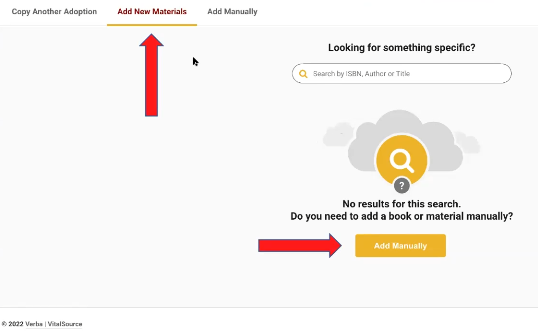
VitalSource Book Adoption page where the Add New Materials tab is selected and the option of Add Manually is recommended for faculty to select.


Using Open Educational Resources (OER) materials in summer 2022 or fall 2022? Please include them in your course materials adoption request with the SU Bookstore. Informing students that courses will be using OER resources is better than listing no course materials.


To add OER course materials:

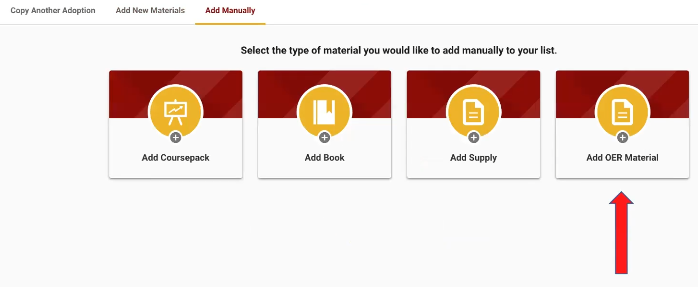
  1. When you go into your adoption, select add materials manually button.
  2. On the far-right hand side of the screen, there will be an add OER materials button.
  3. If you have multiple OER materials, providing at least one entry will suffice. 


By providing some information, students looking at course materials via the Bookstore website during preregistration will be informed that your course is using materials, but at little to no cost to the student.

Teaching and Learning Conference Recordings

Missed the TLC or attended one concurrent session, but interested in the other sessions? We are happy to announce that the sessions from the 12th Annual Teaching and Learning Conference are available by joining the conference site in MyClasses.  

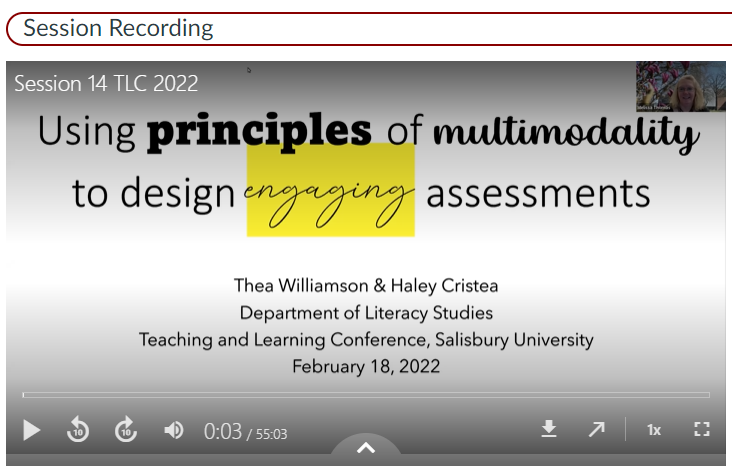
TLC 2022 session recording example

Visit https://salisbury.instructure.com/courses/52463and join this course in the top right. 


To access a session recording, scroll down to Virtual Conference Schedule on the home page. Expand each virtual session for a link to that session's abstract and recording.

MyClasses Spotlight: Split Names in the Gradebook

As you may already know, Canvas updates monthly to respond to suggestions and requests from users like you to improve the features available in the learning management system (LMS). In this week's newsletter, we highlight an updated feature that may be of interest to you. 


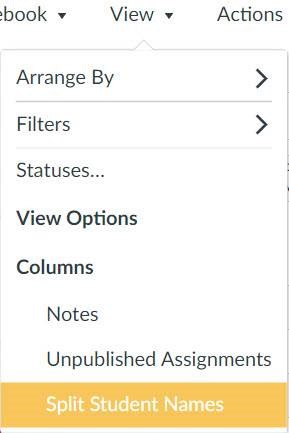
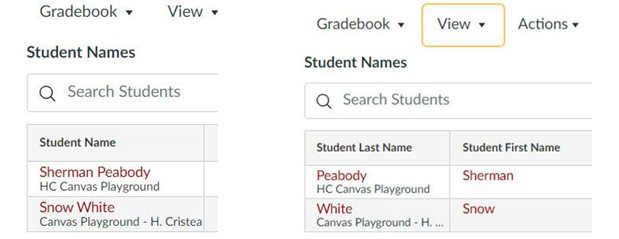
Canvas has included the option to split student names into two separate columns, to show first and last name separately, by using the View dropdown menu in the Gradebook. When enabled, the Gradebooks default will remain the combined name column, but you will have the option to enable and disable the split names option in the Gradebook at will.

The View dropdown menu in the gradebook with the Split Students Name option highlighted.

When student names are split, the Last Name column includes secondary information (course section) and both columns can still be sorted and reordered. When split names are enabled in the Gradebook, they are displayed in the Gradebook CSV export.


Note: If a user has set a preferred name that is different from their legal name, the legal name is displayed in the Gradebook. 


                Gradebook Names Merged                            Gradebook Names Split

Side by side examples of gradebook names merged in a single column and gradebook names split into two columns of  Last Name, First Name.

In order to turn on this feature, an admin (a member of the ID&D team) will need to enable it in SU's MyClasses instance of Canvas.

Audrey II from Little Shop of Horrors

"Feed me, Seymour!"

This is where we want to hear from you!

Complete this short survey to tell us

if you would like this feature enabled in MyClasses! 

March and April ID&D Workshop Offerings

ID&D is offering workshops in March and April that focus on managing your gradebook (just in time for midterm grading), New Quizzes functionality and updating your course design using Design ToolsTo view more details about each session and to register for one or more workshops, please go to the Faculty Development Calendar. 

Using New Quizzes: Creating and Migrating Assessments in MyClasses

Friday, March 11 ● 10-11:30 a.m. (EST)


Gradebook Tips and Tricks

Friday, March 11 ● 2-3 p.m. (EST)


Design Tools Part I: Give Your Canvas Courses a Boost – With Design Tools

Friday, March 18 ● 10-11 a.m. (EST)


Using New Quizzes: Creating and Migrating Assessments in MyClasses

Friday, April 8 ● 2-3:30 p.m. (EST)


Design Tools Part II: Advanced Design Tools

Friday, April 15 ● 10-11 a.m. (EST)

From Day to Week to Month: Celebrating Women!

March 8 is International Women's Day, first celebrated in 1911 where women around the world were presented with flowers and gifts. By 1978, cities and school in California were leading a week-long celebration of women and their contributions to events in history and contemporary society. In 1980, President Jimmy Carter declared this week-long celebration as a national event, and in 1987, Congress announced the expansion from a week to a month and declared March as Women's History Month.


To celebrate Women's History Month at SU and in your classroom, you can:

  • Incorporate discussions on the International Women's Day topic focused on breaking free of bias, stereotypes and discrimination. #BreakTheBias
  • Attend and participate in the Salisbury University Women's Forum's (SUWF) March 11 virtual presentation and talk with the theme Keeping Hope Alive. Keep an eye out for the Zoom link in your email!
  • Join the Women’s Circle of Salisbury University to build connections and support systems for women.
  • Attend the Myth Busting the Elusive “Work-Life Balance” Zoom event hosted by the SU Women's Circle.
  • Continue to reference SU's Library Guide for Diversity and Inclusion, which has a section dedicated to gender resources.
  • Visit The Library of Congress-led site that provides teacher resources for commemorating and encouraging the study, observance and celebration of the vital role of women in American history.
 

Need Help?

Contact an Instructional Designer


Review our ID&D Knowledge Base for instructional software how-tos and pedagogical best practices. (SU Login required).


You can also search the IT HelpDesk Knowledge Base, such as for information about Teams, Zoom, and Office 365.

Can't find the information you need in the Knowledge Base?


Please use the I Need Help? option to submit a Help Request in the ID&D Support Center.


Schedule a Virtual Appointment:

Monday-Friday, 8 a.m.-4:30 p.m.


Visit & Follow Us

ID&D Office: 

Guerrieri Academic Commons, Room 220


Office Hours: 

Monday-Friday: 8 a.m.-4:30 p.m.


Faculty Studio

Guerrieri Academic Commons, Room 221


Department Information:

W: www.salisbury.edu/instructionaldesign

E: suidd@salisbury.edu

P: 410-677-6585

View Online


url    youtube
Salisbury University Logo

SU is an Equal Opportunity/AA/Title IX university and provides reasonable accommodation given sufficient notice to the University office or staff sponsoring the event or program. For more information regarding SU’s policies and procedures, please visit www.salisbury.edu/equity.


View Online