Salisbury University |  Instructional Design & Delivery Newsletter | February 25, 2026

Instructional Design and Delivery: News and Events

Black History Month Celebrates 100 Years

Black History Month 2026 "A Century of Black History Commemorations"

Did you know that Black History Month is also celebrating 100 years? In collaboration with the Edward H. Nabb Research Center, ID&D celebrates African American faculty and staff who have made meaningful contributions to teaching excellence and student success across our campus.


This year’s Black History Month’s theme is A Century of Black History Commemorations, and we encourage you to view some of their hosted events from the month:


Dr. Carter G. Woodson initiated Black History Week in 1926 (which became a month in 1976) and was a co-founder of today’s Association for the Study of African American Life and History (ASALH). 

16th Annual Teaching & Learning Conference:
Session Recordings

A group of TLC attendees seated in PH 156 watching a presenter who is off screen.

20 engaging sessions, 18 virtual attendees, 115 in-person attendees, and an inspiring keynote by Dr. Xiaohong (Sophie) Wang recap the 16th Annual Teaching and Learning Conference (TLC), held on Friday, February 6. The conference continued as a hybrid event, offering both in- person and virtual attendance for selected sessions in PH 156. If you missed the conference or attended but wanted to view recorded sessions, please visit the 2026 TLC site in MyClasses.

Midsemester Check-In With Students: Supporting Student Success and Improving Pedagogical Practices

An open laptop sits on a table with a mid-semester course survey on the screen asking questions about how the course is going for the student. The computer is surrounded by study and comfort items, such as a cell phone with a "Time for a Survey" reminder on the screen, a notebook and pen, coffee, headphones, and a plant.

While end-of-semester course evaluations can be a great source for student feedback about a course and instructor, they comes at a time that is too late for the current learners. Instead, consider adding a formative feedback strategy to ask students what is working (or not) so far in the course. Such formative feedback is important because it allows you to identify areas where students are struggling and to provide timely support, which in turn helps students succeed in meeting the course objectives. 


Midsemester feedback is also important for strengthening your pedagogy because it can help you reflect on your teaching practices. By understanding how students are experiencing the course, you can identify areas where additional instructional materials may clarify a particular concept or how more effective communication or engaging teaching practices can be added to your course to support student learning.


ID&D has provided a Formative Course Assessment in the Canvas Commons that you can import and modify for your MyClasses course. 


Not sure how to import content from the Canvas Commons? We have a video tip for that!

Level Up Your Grading: Discover Enhanced Rubrics 

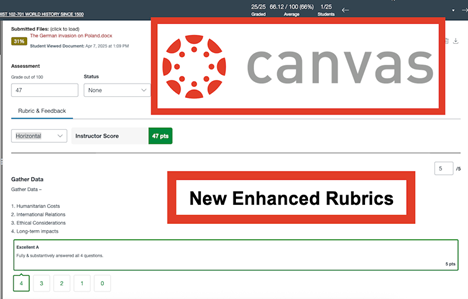
Canvas new enhanced rubrics edit view

MyClasses has introduced Enhanced Rubrics to make creating, managing, and applying rubrics more intuitive for instructors. Whether you are building a new assessment or fine-tuning an old one, these updates streamline your workflow and offer more flexibility in how you provide feedback. 


What’s New?

The Enhanced Rubrics interface brings several improvements to your course management: 

  • Improved Navigation & Search: Easily locate specific rubrics with a new search bar and sort your rubrics by name, total points, or even by where they are currently used in your course.  
  • Flexible Editing: Toggle between different rubric types—such as Scale or Written Feedback—and choose whether to display ratings as levels or point values.
  • Speedgrader Views: Within Speedgrader, you can adjust how you see your rubrics when grading with three different views – traditional, horizonal, or vertical
  • Drag-and-Drop Organization: Rearrange criterion ratings using a simple click-and-drag icon. You can also duplicate existing criteria to save time when building complex rubrics.
  • Archive vs. Delete: Not using a rubric this semester? Instead of deleting it and losing historical data, you can now Archive rubrics. This hides them from your active list while keeping them attached to past assignments.
  • One-Click Duplication & Sharing: Need a similar rubric for another course? Use the Duplicate tool to create a copy in seconds, or the Copy To feature to send a rubric directly to another course or a specific assignment.


Pro Tip: Managing "In-Use" Rubrics

To maintain grading integrity, Canvas limits edits on rubrics that are attached to more than one assignment. If you need to make changes to a rubric currently in use, simply use the Duplicate feature to create a fresh version, edit as needed, and swap it into your new assignment!


Enable Enhanced Rubrics

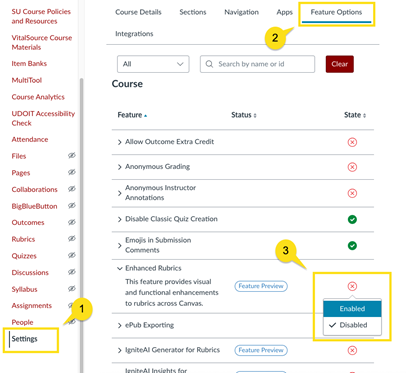
Ready to try it? Within your MyClasses course, navigate to the Settings link in your course navigation, select the Feature Options tab, locate Enhance Rubrics, and then slide the toggle button on. Once the feature is turned on, you’re ready to go!

Step-by-step instructions for enabling Enhanced Rubrics in a course

Step-by-step instructions about the features are available in this Canvas Article – Enhanced Rubrics Instructions.  There is also a tutorial video – Enhanced Rubrics Tutorial that visually walks you through each feature, what it looks like, and how to use it.  

Upcoming Professional Development

Instructional Design and Delivery offers monthly pedagogical and instructional technology workshops throughout the semester. Workshop descriptions and registration are available in the Faculty Development Calendar.

Scaffolding Assignments for Student Success: Small Steps, Big Impact


Need Assistance?

Ways to get help:

♦ Search our ID&D Knowledge Base

♦ Submit a Help Request

♦ Contact your Instructional Designer 

♦ Schedule a Virtual Appointment

Visit & Follow Us

Department Information:

W: salisbury.edu/instructionaldesign

E: suidd@salisbury.edu

O: Guerrieri Academic Commons, 220

P: 410-677-6585

Instructional Design and Delivery YouTube
Instructional Design and Delivery  X (formerly Twitter)
Instructional Design and Delivery Workshop Calendar
Salisbury University Logo

SU is an Equal Opportunity/AA/Title IX university and provides reasonable accommodation given sufficient notice to the University office or staff sponsoring the event or program. For more information regarding SU's policies and procedures, please visit salisbury.edu/equity.


View Online